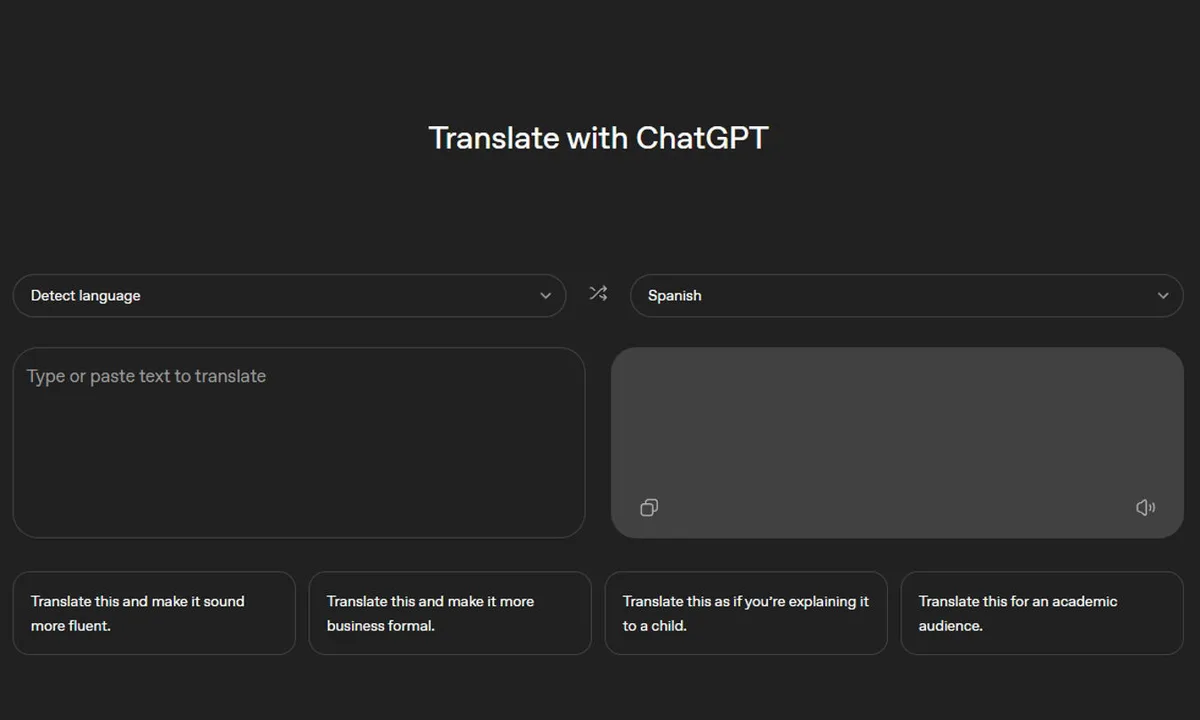
ChatGPT Translate is now a standalone translation page, designed to fit the quick translation habit most of us have: paste the text, get a quick result, and move on. OpenAI hasn’t officially announced its release, but the tool is available now and supports translation to and from more than 50 languages with automatic language detection.
But what really sets it apart is what comes next
After the translation appears, ChatGPT Translate offers one-click options that send the result to ChatGPT for rewording, such as improving fluency, converting it to formal language, simplifying it for children, or optimizing it for academic audiences. This makes it more like a complete writing process that starts in another language, rather than just a utility.
It looks similar to Google Translate at first
The user interface is very familiar. You type on one side, get the result on the other, and you don’t need to select the source language if you don’t want to.
Then, help shortcuts appear below the result, and the product’s appearance changes. Clicking on one of them will redirect you to the main ChatGPT experience with ready-made instructions, allowing you to continue editing without starting from scratch. You can maintain the meaning while softening the pronunciation, making it more direct, or rephrasing the phrase to better suit the person you’re speaking to.
The shortcomings are clear
The current shortcomings of ChatGPT Translate aren’t so much about translation quality as they are about its comprehensiveness. The page mentions support for translating uploaded images, but on computers, there’s no clear way to add an image to the translation field right now, so it functions like a regular text translator.
On mobile, things are more flexible. In the phone’s browser, you can use the microphone to speak what you want to translate. However, there’s no support for documents, handwriting, websites, or instant messaging—areas where Google Translate has excelled for years. The number of languages is also limited. Having more than 50 languages is helpful, but Google offers a much larger number.
What’s next?
Google isn’t standing still. It announced translation upgrades powered by the Gemini processor, including improvements to handling slang, colloquialisms, and local expressions, as well as a beta version of real-time speech-to-speech translation using headphones, and new languages specifically designed for learning.
This sets a new standard for OpenAI. For now, use ChatGPT Translate when you need to get your message across effectively, not just retain its meaning. Save Google Translate when you need a wider range and multiple translation styles. If OpenAI adds image input, document support, and broader language coverage, the competition will quickly intensify.